
RoboForex
Min: Deposit $5, Leverage up to 1:2000 Broker STP/ECN $30 Free Bonus
Min: Deposit $5, Leverage up to 1:2000 Broker STP/ECN $30 Free Bonus

100% Forex Bonus, Min: Deposit $100, Broker Type: STP/NDD $30 Free Bonus

120% Forex Bonus, Min: Deposit $100 , Broker Type: STP/NDD $30 Free Bonus

Min: Deposit $1, Leverage up to 1:500, Type ECN/STP $30 No Deposit Bonus
| # | Logo | Broker | Year | For | Against | Type | Regulation | Leverage | Min. deposit | Review |
|---|---|---|---|---|---|---|---|---|---|---|
| 1 | JustMarkets | 2012 | 36% | 4% | ECN/STP | FSA, CySEC, FSCA, FSC | 1:3000* | 1 | Review | |
| 2 | Headway | 2023 | 35% | 4% | CFDs | Regulated by FSCA | 1:1000* | 100 | Review | |
| 3 | Valetax | 2023 | 35% | 1% | ECN/STD | FSC | 1:2000* | 10 | Review | |
| 4 | RoboForex | 2009 | 35% | 4% | ECN/STD | FSC | 1:2000* | 10 | Review | |
| 5 | XM | 2009 | 35% | 1% | Broker, MM | ASIC, CySEC, IFSC | 1:888* | 10 | Review | |
| 6 | InstaForex | 2007 | 34% | 2% | ECN/STD | BVI FSC, CySec | 1:1000* | 1 | Review | |
| 7 | KCM Trade | 2016 | 32% | 3% | ECN/STD | FSC | 1:400* | 100 | Review | |
| 8 | Plotio | 1983 | 31% | 2% | STP | HKGX, ASIC, SCB | 1:300* | 200 | Review | |
| 9 | FISG | 2011 | 30% | 1% | ECN/STD | FSA, CySEC, ASIC | 1:500 | 0.01 | Review | |
| 10 | Hantec Markets | 1990 | 30% | 6% | ECN/STP | ASIC, FCA, FSA-Japan, FSC, JSC | 1:2000* | 100 | Review | |
| 11 | Amillex | 2025 | 29% | 6% | ECN/STP | ASIC, FCA | Up to 1:500 | 100 | Review | |
| 12 | ATFX | 2017 | 25% | 3% | Broker/NDD | FCA, CySEC, FSCA | 1:400* | 100 | Review | |
| 13 | Octa | 2011 | 20% | 3% | ECN/STD | Regulation: CySEC, MISA, FSCA and FSC | 1:1000* | 5 | Review | |
| 14 | Trust Capital | 2019 | 20% | 2% | CFDs | FSA, CySEC, SCA | Up to 1:1000 | 100 | Review | |
| 15 | Axiory | 2011 | 15% | 5% | Broker, NDD | IFSC, FSC, FCA (UK) | 1:777* | 10 | Review | |
| 16 | FBS | 2009 | 13% | 4% | ECN/STD | IFSC, CySEC, ASIC, FSCA | 1:3000* | 100 | Review | |
| 17 | Yamarkets | 2018 | 11% | 2% | ECN/STD | VFSC, MISA, | 1:1000* | 100 | Review | |
| 18 | FXTRADING | 2014 | 9% | 3% | ECN/STD | AFSL, VFSC | 1:500* | 100 | Review | |
| 19 | FXTM | 2011 | 5% | 0% | ECN/STD/MM | FSC, FCA, CySEC, FSCA | 1:500 | 10 | Review | |
| 20 | ActivTrades | 2001 | 5% | 1% | ECN/STD | FCA, CSSF | 1:300* | 250 | Review | |
| 21 | Exness | 2008 | 5% | 0% | ECN, Market Maker, NDD | FCA, CySEC, SFSA, CNMV, AFM, BaFin | 1000 | 1 | Review | |
| 22 | FX Choice | 2009 | 5% | 30% | NDD, Market Execution | FSC | 1:200* | 100 | Review | |
| 23 | FxPro | 2006 | 4% | 0% | Broker, NDD | CySEC, FCA, FSCA, SCB | 1:200* | 10 | Review | |
| 24 | HFM | 2010 | 4% | 3% | ECN/STD | CySEC, FCA, DFSA, FSCA, FSA, CMA | 1:1000* | 5 | Review | |
| 25 | IronFX | 2010 | 4% | 3% | ECN/STD | FCA, ASIC, FSCA and CySEC | 1:500* | 10 | Review | |
| 26 | FXCM | 1999 | 4% | 0% | ECN/STD | FCA, ASIC, CONSOB, BaFin | 1:500* | 10 | Review | |
| 27 | NordFX | 2008 | 4% | 0% | ECN/STD | VFSC, CySEC, SEBI | 1:1000* | 10 | Review | |
| 28 | FP Markets | 2005 | 4% | 0% | ECN/STP/DMA | ASIC, CySEC | 1:1000* | 100 | Review | |
| 29 | AMarkets | 2007 | 4% | 0% | ECN/STD | SVGFSA (FSA) | 1:1000* | 10 | Review | |
| 30 | M4Markets | 2020 | 4% | 0% | ECN/STD | SVGFSA, Licence No SD035 | 1:500* | 50 | Review | |
| 31 | CWG Markets | 2018 | 4% | 0% | ECN/MM | FCA (UK) VFSC | 1:500* | 100 | Review | |
| 32 | Eightcap | 2009 | 4% | 0% | ECN/STD | ASIC, VFSC | 1:500* | 100 | Review | |
| 33 | LBLV | 2018 | 3% | 0% | ECN/STD | Seychelles FSA | 1:500* | 10 | Review | |
| 34 | FXCC | 2010 | 3% | 0% | ECN/STD/MM | CySEC | 1:200* | 10 | Review | |
| 35 | Libertex | 1997 | 3% | 0% | ECN/STD | CySEC | 1:3000* | 10 | Review | |
| 36 | Axiance | 2020 | 3% | 1% | ECN/STD | CySEC, FSA, FSC | 1:100* | 100 | Review | |
| 37 | FXPRIMUS | 2015 | 3% | 0% | ECN/STD | FSCA, VFSC, CySEC | 1:500* | 100 | Review | |
| 38 | TMGM | 2017 | 3% | 0% | ECN/STD | ASIC, FSP, VFSC | 1:400* | 200 | Review | |
| 39 | easyMarkets | 2001 | 3% | 0% | Broker | CySEC, MiFID, ASIC | 100 | 25 | Review | |
| 40 | Oanda | 1996 | 3% | 0% | Broker, MM | CFTC, NFA, FSA | 50 | 1 | Review | |
| 41 | eToro | 2007 | 3% | 0% | ECN/STD/MM | CySEC, ASIC, FCA | 400:1 | 50 | Review | |
| 42 | XTB | 2002 | 3% | 0% | ECN/STP | FCA | 1:200* | 250 | Review | |
| 43 | FxGlory | 2011 | 2% | 0% | ECN/STD/MM | IFSA | 1:3000* | 1 | Review | |
| 44 | Buxberg | 2021 | 2% | 0% | ECN/STD/MM | CFTC, NFA | 1:400* | 2500 | Review | |
| 45 | LegacyFX | 2012 | 2% | 0% | ECN/STD | VFSC, CySEC, NBRB, BaFin, FCA, FSP | 1:200* | 10 | Review | |
| 46 | AvaTrade | 2006 | 2% | 0% | ECN/STD | MiFiD, FSA, ASIC, FSRA, CySEC | 1:400* | 10 | Review | |
| 47 | LIRUNEX | 2016 | 2% | 0% | ECN/STD | CySEC | 1:1000* | 25 | Review | |
| 48 | FOREX.com | 1999 | 2% | 0% | Broker, MM | CFTC, FCA, ASIC, FSA | 50 | 500 | Review | |
| 49 | Saxo Bank | 1992 | 2% | 0% | ECN/STP/DMA | FSA | 200:1 | 2000 | Review | |
| 50 | Orbex | 2010 | 2% | 0% | ECN/STD | CySEC | 1:500* | 500 | Review |
MT4 forex brokers still serve a huge share of retail traders, because MetaTrader 4 remains one of the most familiar charting and execution platforms in the industry. Choosing among MT4 forex brokers is less about the software, which is identical everywhere, and more about the trading conditions each firm wraps around it.
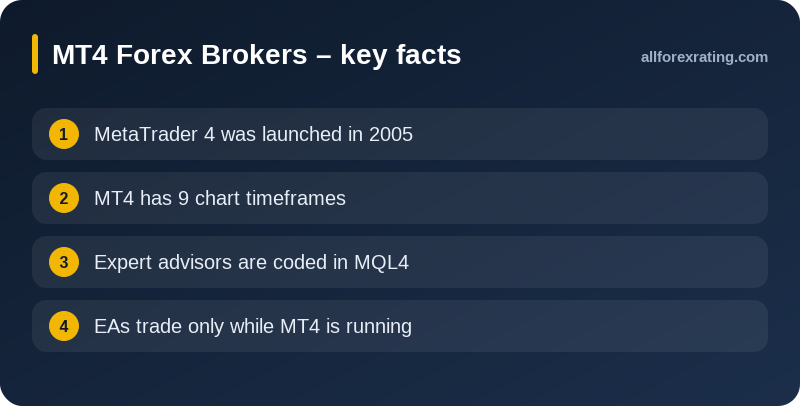
Launched by MetaQuotes in 2005, MT4 became the default platform for currency trading thanks to its simple interface, stable performance on modest hardware and the MQL4 programming language. Over the years, traders have built an enormous ecosystem of indicators, scripts and expert advisors around it, and many prefer not to give up tools they know well.
MetaQuotes now concentrates new development on MetaTrader 5, and some brokers offer only MT5 to new clients. That makes it worth confirming that a broker actively supports MT4 before you commit. You can read about the platform itself on the official MetaTrader 4 website.
| Strengths | Limits |
|---|---|
| Huge library of free and paid indicators | Only 9 chart timeframes |
| Light on system resources | No built-in economic calendar |
| Easy to learn for beginners | Single-threaded strategy tester |
| Supported by many brokers and VPS providers | Designed mainly for forex and CFDs |
For most manual forex traders, these limits are minor. Nine timeframes cover the charts that most strategies use, and a free economic calendar is easy to find elsewhere. The bigger question is whether your broker keeps its MT4 servers stable and updated, and whether its pricing feed is clean during busy sessions. Reports from other users are often the quickest way to find out, which is why traders' feedback on MT4 forex brokers is so valuable.
If those limits matter to you, compare our list of MetaTrader 5 brokers as well.
Be cautious with robots sold with promises of guaranteed returns. Past backtests do not predict future results. Our expert advisor hub explains how automated strategies work and how to evaluate them.
An EA only trades while the terminal is open and connected. Many traders rent a virtual private server near the broker's trade server to keep MT4 online and reduce latency. Some brokers provide a free VPS once you meet a monthly volume or balance requirement, so ask before paying for one.
Whether you use a VPS or your own computer, keep an eye on the Journal and Experts tabs at the bottom of the terminal. They log connection drops, rejected orders and EA errors, and checking them regularly is the easiest way to spot a problem before it costs you money.
The brokers listed above all support MetaTrader 4, and their order comes from traders' For and Against votes rather than advertising budgets. Shortlist a few, then check their pricing on our low spread brokers page or run a direct comparison with the compare tool. If you are new to the platform, the beginner education section covers order types and basic chart reading.
Remember that leveraged forex and CFD trading carries a high risk of loss. A familiar platform helps you act quickly, but disciplined risk management is what protects your account.
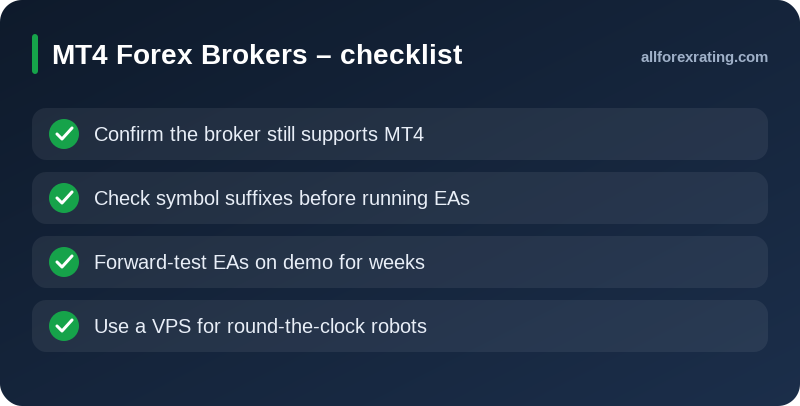
Many still do, although some now open new accounts only on MetaTrader 5. Check the broker's platform page or ask support before you apply.
Download MT4 from your broker, open it and choose File, then Login to Trade Account. Enter your account number, password and the server name your broker sent you.
Brokers use different server time zones. Those on GMT+2/GMT+3 close daily bars at 5 pm New York time, while others may create an extra Sunday candle.
MetaQuotes and many brokers offer Mac-compatible versions, and the MT4 web and mobile apps work on any device. Some brokers package the Windows version for macOS.